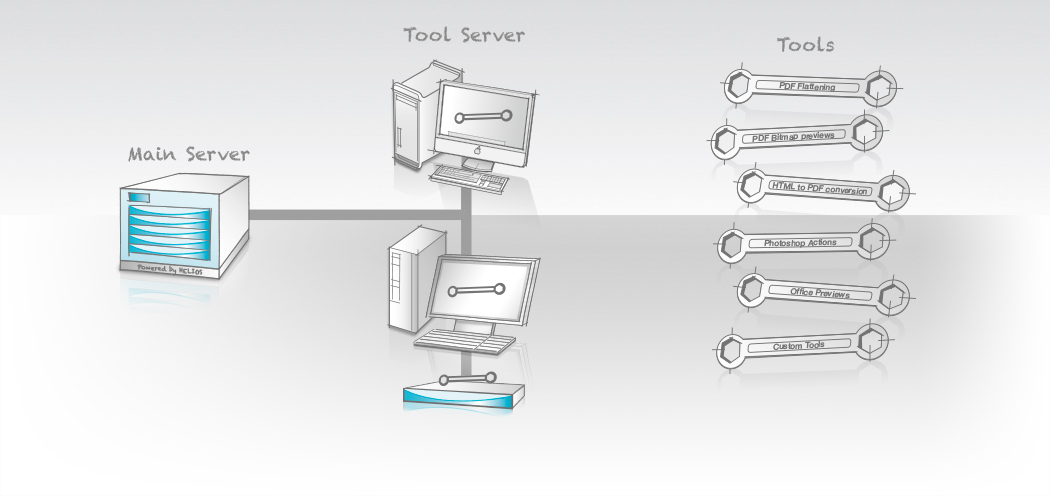
Tool Server G8 enables applications running on network clients to be automated and controlled remotely by the HELIOS server. Many applications and technologies are available only on specific platforms. Tool Server makes these applications and technologies available to your HELIOS server – either as a standalone process or integrated into server workflows.
Tool Server
enables applications running on network clients to be automated and controlled remotely by the HELIOS server. Many applications and technologies are available only on specific platforms. Tool Server makes these applications and technologies available to your HELIOS server – either as a standalone process or integrated into server workflows.
Virtually any application that can be automated (via AppleScript, shell script, VBA, Automator, etc.) on any platform (Mac, Windows, or UNIX) can become a Tool Server tool. The system administrator simply writes the automation script; Tool Server handles the rest.
The Client Server Infrastructure
is provided by Tool Server. The “toolclient” application automatically discovers all available servers via Bonjour and selects the Tool Server workstation that offers the required service with the best performance. Automatic job load balancing, file transfer, processing, auditing, and error handling make operation straightforward. Jobs can run fully automatically through the “toolclient” application or by placing files into Script Server hot folders. Hot-folder automation is easy to configure and monitor in HELIOS Admin.
Sample tool scripts are included for common tasks such as flattening PDF documents with Adobe Acrobat or sharpening images with Photoshop. Additional examples cover AppleScript, Visual Basic, REALbasic, Perl, and other languages.
Remote Workflows
can be enabled by sharing HELIOS Script Server hot folders via HELIOS WebShare.
Licensing
The tool client requires an ImageServer license. See the Tool Server manual for full licensing details. Office-to-PDF conversion requires Microsoft Office on Mac or Windows (not included). Automated applications must be used in accordance with their own licensing terms.

- Home
- Products
File Server Products
- Powerful and fail-safe
- Perfect for mixed networks (Mac, Windows, Web clients)
Cloud Products- Secure access to files anytime and anywhere
- No “Cloud” disadvantages
- For businesses and IT service providers
- For Mac, PC, iPad, iPhone, web
Automation- Server-based workflow automation via hot folders
- Automate applications on remote computers (e.g. Photoshop actions and Acrobat PDF creation)
- Launch scripts depending on file type
- No polling
Marketing & Premedia- Server-based image processing with ICC color management
- Image conversions for Internet and print
- Automation via hot folder
- Certified soft proof with annotations
- Industries
- Solutions
- SupportSupport
Offering professional support and excellent technical resources is very important to us. HELIOS partners offer first level support. Our goal is that every problem and question must be resolved.
Updates & Tech InfoKeep the installation always up to date. Install important updates, read technical information on various topics.
Developers & Advanced StuffHELIOS solutions are often integrated into custom solutions. Here you will find advanced technical information.
MediaAll documentation is available online. We provide great overview and training videos which should help you getting started.
- News
The HELIOS News contains …
Latest Press Release: > HELIOS Universal File Server G8 released … • Latest Newsletter: > HELIOS Newsletter 02/2021 …
- Company
- English
 Enterprise Server
 Developers / SDK
 Retail / Industrial
 Newspapers / Publishers
 Photographer / Studios
 Ad Agencies / Premedia / Printers
 Video & Entertainment
 Cloud Collaboration
 HD Color
 Image Processing
 Proofing
 WebShare Connectivity
 Workflow Automation
 File Server
 Press Releases
  Videos
  Newsletters
  Events