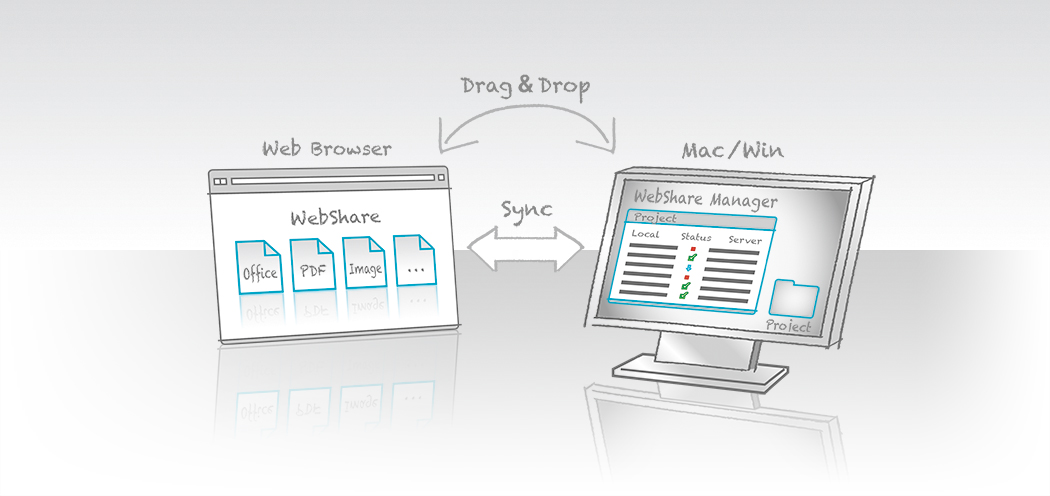
WebShare Manager allows automatically synchronizing files and folders between a WebShare file server and remote workstations. Transfer files easily via “drag & drop” between web browser and desktop.
WebShare Manager G8
enables seamless file and folder synchronization between a WebShare server and remote workstations. Using a standard web browser, remote users can browse server content in WebShare and drag and drop files and folders between a WebShare sharepoint and their local desktop. Changes are synchronized automatically.
Project-Oriented Workflow
Each WebShare Manager project is a flexible bundle that can reference files located anywhere on a WebShare server. This makes it simple to work with groups of related files – even when those files are scattered across multiple folders on the server.
Drag-and-Drop Support
lets remote users transfer files directly from WebShare into a WebShare Manager project folder on their local workstation. Conversely, local files dragged into the project folder are automatically uploaded to the WebShare server.
One-Way or Two-Way File Sync
Every WebShare Manager project includes a Synchronize Plan that defines how and when changes between local and remote files are synchronized.
Optimized Transfers
Multiple files transfer in parallel for efficient bandwidth use. Interrupted transfers automatically resume once the network connection is restored. Large file transfers are fully supported.
No Cloud Copy of Data
WebShare works directly with the company file server through its two-tier server architecture. Full support for enterprise users, groups, and permissions is maintained – no data is stored in the cloud.
WebShare Manager is a core feature of HELIOS WebShare. See the WebShare data sheet for additional details and system requirements.

- Home
- Products
File Server Products
- Powerful and fail-safe
- Perfect for mixed networks (Mac, Windows, Web clients)
Cloud Products- Secure access to files anytime and anywhere
- No “Cloud” disadvantages
- For businesses and IT service providers
- For Mac, PC, iPad, iPhone, web
Automation- Server-based workflow automation via hot folders
- Automate applications on remote computers (e.g. Photoshop actions and Acrobat PDF creation)
- Launch scripts depending on file type
- No polling
Marketing & Premedia- Server-based image processing with ICC color management
- Image conversions for Internet and print
- Automation via hot folder
- Certified soft proof with annotations
- Industries
- Solutions
- SupportSupport
Offering professional support and excellent technical resources is very important to us. HELIOS partners offer first level support. Our goal is that every problem and question must be resolved.
Updates & Tech InfoKeep the installation always up to date. Install important updates, read technical information on various topics.
Developers & Advanced StuffHELIOS solutions are often integrated into custom solutions. Here you will find advanced technical information.
MediaAll documentation is available online. We provide great overview and training videos which should help you getting started.
- News
The HELIOS News contains …
Latest Press Release: > HELIOS Universal File Server G8 released … • Latest Newsletter: > HELIOS Newsletter 02/2021 …
- Company
- English
 Enterprise Server
 Developers / SDK
 Retail / Industrial
 Newspapers / Publishers
 Photographer / Studios
 Ad Agencies / Premedia / Printers
 Video & Entertainment
 Cloud Collaboration
 HD Color
 Image Processing
 Proofing
 WebShare Connectivity
 Workflow Automation
 File Server
 Press Releases
  Videos
  Newsletters
  Events