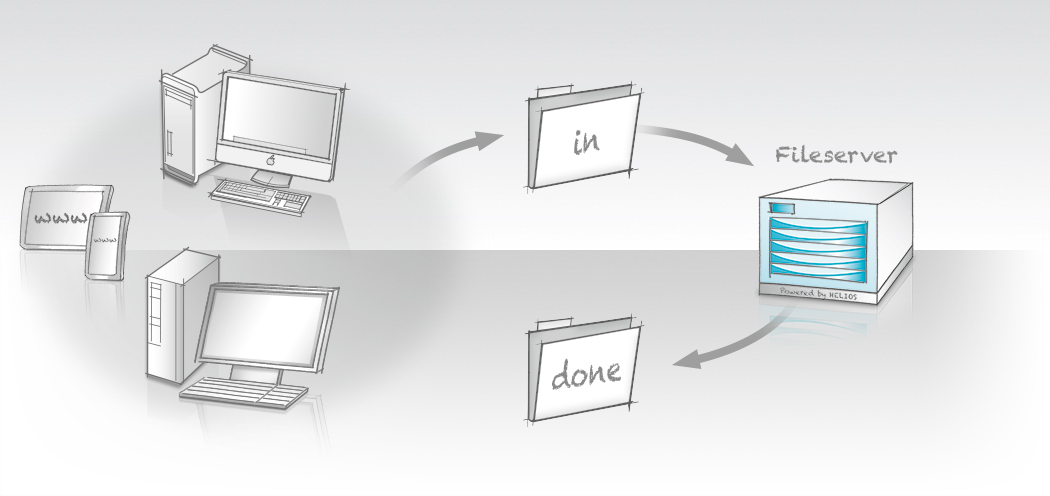
Hot Folder Automation, provided by Script Server, integrates and automates server applications. Any scriptable task or procedure can be initiated simply by saving files to a server hot folder – or even by designating an entire server volume as a hot folder. The process runs fully automatically in the background.
Hot Folder Automation
provided by Script Server, integrates and automates server applications. Any scriptable task or procedure can be initiated simply by saving files to a server hot folder – or even by designating an entire server volume as a hot folder. The process runs fully automatically in the background.
Script Server is easily configured via HELIOS Admin. Users and administrators can set up hot folders, edit scripts, and monitor job status and logs. HELIOS ScriptAssistant, an interactive utility for Mac and Windows, simplifies the creation of custom Script Server scripts.
The Infrastructure
is provided by Script Server, which handles event notification, file-type recognition, queuing, logging, and more. The system administrator only needs to script the actual task; Script Server takes care of the rest. A single script can be reused across multiple hot folders, with customized variables defined for each one (for example, a printer name, ICC profile, or image resolution). These variables are easily set by users in HELIOS Admin.
Web-based Workflows
can be enabled by sharing Script Server hot folders via HELIOS WebShare. Remote proofing, PDF preflight, image conversion, and similar processes then become accessible from anywhere.
Reliability and Security
are built in. Each script runs as a separate process under the security credentials of a specific user. Time-out and error handling ensure the system continues operating even if a problem occurs.
Sample scripts are included for common processes such as image conversion, ICC color-space transforms, and PDF processing. These scripts can also serve as templates for custom scripts.
Additional details are available at:
www.helios.de/web/EN/products/SS_scripts.html
Script Server is included as a core feature of HELIOS ImageServer. See the ImageServer data sheet for further details and system requirements.
Script Server setup example
Script Server scripts
HELIOS ImageServer
HELIOS ScriptAssistant
Automating applications

- Home
- Products
File Server Products
- Powerful and fail-safe
- Perfect for mixed networks (Mac, Windows, Web clients)
Cloud Products- Secure access to files anytime and anywhere
- No “Cloud” disadvantages
- For businesses and IT service providers
- For Mac, PC, iPad, iPhone, web
Automation- Server-based workflow automation via hot folders
- Automate applications on remote computers (e.g. Photoshop actions and Acrobat PDF creation)
- Launch scripts depending on file type
- No polling
Marketing & Premedia- Server-based image processing with ICC color management
- Image conversions for Internet and print
- Automation via hot folder
- Certified soft proof with annotations
- Industries
- Solutions
- SupportSupport
Offering professional support and excellent technical resources is very important to us. HELIOS partners offer first level support. Our goal is that every problem and question must be resolved.
Updates & Tech InfoKeep the installation always up to date. Install important updates, read technical information on various topics.
Developers & Advanced StuffHELIOS solutions are often integrated into custom solutions. Here you will find advanced technical information.
MediaAll documentation is available online. We provide great overview and training videos which should help you getting started.
- News
The HELIOS News contains …
Latest Press Release: > HELIOS Universal File Server G8 released … • Latest Newsletter: > HELIOS Newsletter 02/2021 …
- Company
- English
 Enterprise Server
 Developers / SDK
 Retail / Industrial
 Newspapers / Publishers
 Photographer / Studios
 Ad Agencies / Premedia / Printers
 Video & Entertainment
 Cloud Collaboration
 HD Color
 Image Processing
 Proofing
 WebShare Connectivity
 Workflow Automation
 File Server
 Press Releases
  Videos
  Newsletters
  Events