1. World of HELIOS: Soft proof replaces hard proofs?
2. WebShare proofing – new server-based color matching feature
3. Time Machine recovery via the Mac OS X Boot DVD
4. Windows 7 compatibility
2. WebShare proofing – new server-based color matching feature
3. Time Machine recovery via the Mac OS X Boot DVD
4. Windows 7 compatibility
|
HELIOS Newsletter 6/2009 |
 |
|
|
|
Dear HELIOS client,
Welcome to the latest information from the world of HELIOS. Keep your networking lead and stay one step ahead. Turn your colleagues on to this newsletter as well, subscription details are below. Enjoy the news.
Your HELIOS team
Helmut Tschemernjak, CEO & President
Welcome to the latest information from the world of HELIOS. Keep your networking lead and stay one step ahead. Turn your colleagues on to this newsletter as well, subscription details are below. Enjoy the news.
Your HELIOS team
Helmut Tschemernjak, CEO & President
1. World of HELIOS: Soft proof replaces hard proofs?
This fall we have been touring internationally to show the WebShare UB+ remote soft proof solution in a browser, on a Quato proof monitor. It was interesting to learn about the religious war: soft proof on a proof monitor versus printed proofs. Some say that a printed proof is always needed, others argue that soft proofing makes shipping printed proofs obsolete. Significantly, everybody was convinced by the excellent quality of the WebShare proofs, and that web-based remote proofing with remote customers and contractors is the way to go. Ultimately, we cannot answer the question whether soft proofing will replace hard proofs. Either way, the WebShare UB+ proofing allows doing both – remote soft proofs and remote hard proofs – using any remote web browser.
2. WebShare proofing – new server-based color matching feature
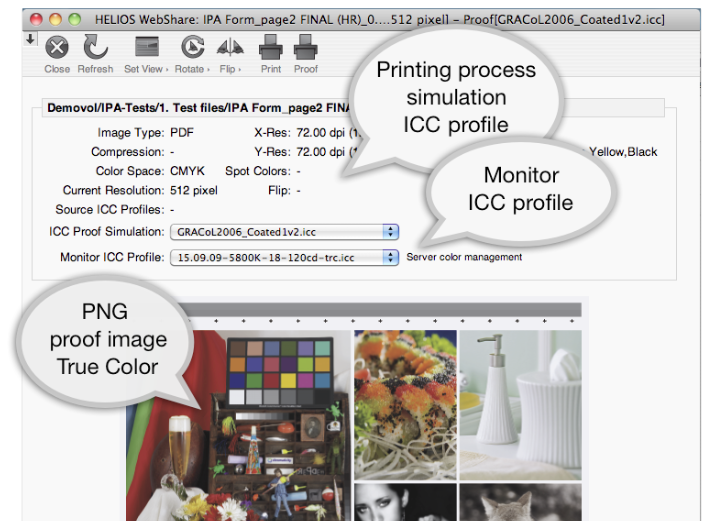
By default, WebShare proofs take advantage of "workstation color management", whereby WebShare converts the image or PDF into the sRGBv4 color space, and the remote browser or print driver converts that into the specific monitor or printer color space. This is an elegant solution that automatically delivers excellent proof results to users.
The new WebShare update u0837 allows more user interaction, to upload and select ICC profiles for "server color management". Since this eliminates a color conversion step, even better proof results can be achieved. The update adds:
3. Time Machine recovery via the Mac OS X Boot DVD
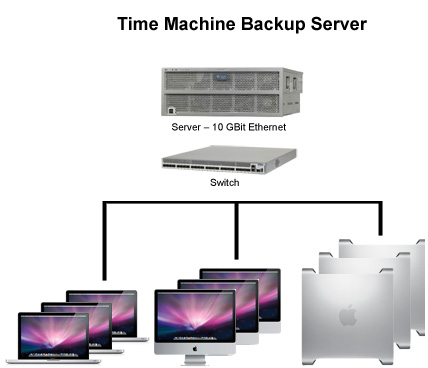
In our previous HELIOS Newsletter, we promoted that Mac clients could use EtherShare UB+ volumes as backup devices (check www.helios.de/news go to HELIOS Newsletter 5/2009). We received tremendous feedback from customers and HELIOS partners – it looks like Time Machine Backup is now strongly considered in corporate environments to backup entire Mac farms to HELIOS EtherShare file servers.
We'd like to share with you the following questions/discussions:
Restoring an entire Mac from the Mac OS X boot DVD
Good news: via HELIOS update (u0842) we added Bonjour registration of the EtherShare Time Machine Backup enabled volumes. This allows booting from the Mac OS X DVD and restoring an entire Mac with just a few clicks – basically a disaster recovery of new or repaired Mac computers. Simple quick and easy – we love to backup your Macs.
Limiting the Time Machine Backup volume size
Most discussions with customers revolved around how to limit the backup volume space allocated per Mac client, to prevent the server disk getting filled up when Time Machine does many incremental backups. By default, Time Machine creates an auto-incrementing HFS disk image per user containing the backup data. Good news here – HELIOS is developing a Mac client tool to create the HFS disk images of a specified size on EtherShare UB+ volumes. We expect to make this tool available before Christmas.
The HELIOS EtherShare UB+ file server offers record performance (600MB/s), which we have not seen anywhere else (details: www.helios.de/viewart.html?id=705-en). One more reason to use it as a Time Machine Backup Server. Overall we welcome all the positive feedback and discussions for our Time Machine Backup Server support. If you have further questions and ideas, use the feedback link at the end of this newsletter.
4. Windows 7 compatibility
The first Windows 7 support calls have come in to HELIOS. Basically, it seems that Windows 7 behaves pretty much like Windows Vista when it comes to SMB file and print server access with HELIOS PCShare UB+. We released an update (u0841) to resolve a server browsing problem for Vista and Windows 7. We will keep you informed in case we learn about additional compatibility issues with Windows 7 – so far, it just works.
This fall we have been touring internationally to show the WebShare UB+ remote soft proof solution in a browser, on a Quato proof monitor. It was interesting to learn about the religious war: soft proof on a proof monitor versus printed proofs. Some say that a printed proof is always needed, others argue that soft proofing makes shipping printed proofs obsolete. Significantly, everybody was convinced by the excellent quality of the WebShare proofs, and that web-based remote proofing with remote customers and contractors is the way to go. Ultimately, we cannot answer the question whether soft proofing will replace hard proofs. Either way, the WebShare UB+ proofing allows doing both – remote soft proofs and remote hard proofs – using any remote web browser.
2. WebShare proofing – new server-based color matching feature
By default, WebShare proofs take advantage of "workstation color management", whereby WebShare converts the image or PDF into the sRGBv4 color space, and the remote browser or print driver converts that into the specific monitor or printer color space. This is an elegant solution that automatically delivers excellent proof results to users.
The new WebShare update u0837 allows more user interaction, to upload and select ICC profiles for "server color management". Since this eliminates a color conversion step, even better proof results can be achieved. The update adds:
- ICC proof profile upload and administration per user
- User selection of printer and monitor ICC profiles
- Ability to upload ICC profiles to be available to all users
|
3. Time Machine recovery via the Mac OS X Boot DVD
In our previous HELIOS Newsletter, we promoted that Mac clients could use EtherShare UB+ volumes as backup devices (check www.helios.de/news go to HELIOS Newsletter 5/2009). We received tremendous feedback from customers and HELIOS partners – it looks like Time Machine Backup is now strongly considered in corporate environments to backup entire Mac farms to HELIOS EtherShare file servers.
We'd like to share with you the following questions/discussions:
Restoring an entire Mac from the Mac OS X boot DVD
Good news: via HELIOS update (u0842) we added Bonjour registration of the EtherShare Time Machine Backup enabled volumes. This allows booting from the Mac OS X DVD and restoring an entire Mac with just a few clicks – basically a disaster recovery of new or repaired Mac computers. Simple quick and easy – we love to backup your Macs.
Limiting the Time Machine Backup volume size
Most discussions with customers revolved around how to limit the backup volume space allocated per Mac client, to prevent the server disk getting filled up when Time Machine does many incremental backups. By default, Time Machine creates an auto-incrementing HFS disk image per user containing the backup data. Good news here – HELIOS is developing a Mac client tool to create the HFS disk images of a specified size on EtherShare UB+ volumes. We expect to make this tool available before Christmas.
The HELIOS EtherShare UB+ file server offers record performance (600MB/s), which we have not seen anywhere else (details: www.helios.de/viewart.html?id=705-en). One more reason to use it as a Time Machine Backup Server. Overall we welcome all the positive feedback and discussions for our Time Machine Backup Server support. If you have further questions and ideas, use the feedback link at the end of this newsletter.
4. Windows 7 compatibility
The first Windows 7 support calls have come in to HELIOS. Basically, it seems that Windows 7 behaves pretty much like Windows Vista when it comes to SMB file and print server access with HELIOS PCShare UB+. We released an update (u0841) to resolve a server browsing problem for Vista and Windows 7. We will keep you informed in case we learn about additional compatibility issues with Windows 7 – so far, it just works.
Mailing List Preferences
To subscribe or unsubscribe from this list, notify support (at) helios.de
To subscribe or unsubscribe from this list, notify support (at) helios.de
Smart Ideas for Better Networking.
|
 |